6 Lists and Tuples
In This Chapter
So far, our variables have been like name tags attached to a single piece of data, like the number 100 or the string "sword". But if we want the player to hold a sword, a shield, a potion, and a map, creating separate variables like item1, item2, and item3 gets messy.
To build complex software, we need a way to store collections of information in a single place. In this chapter, we will learn our first Data Structure. We will cover:
- Lists How to store multiple pieces of data in a single object.
- Zero-Indexing: How computers count.
- Aliasing: What happens when two variables point to the exact same list in memory.
- Slicing Lists: How to grab chunks of data at a time.
- List Operations & Methods: Adding, removing, popping, and combining lists.
- Splitting Strings: Instantly turning sentences into lists.
- Tuples: An immutable (“locked”) version of a list.
- The Project: Adding a dynamic inventory system to our Dark Cave adventure.
6.1 The List
A Data Structure is a specialized format for organizing and storing data. The most common data structure in Python is the List.
If a normal variable points to a single object in the computer’s memory warehouse, a List is like a large filing cabinet. It is a single object, but it has multiple drawers inside it, and each drawer can hold a different value.
To create a list in Python, we use square brackets [ ] and separate the items with commas.
# A list of strings
backpack = ["sword", "shield", "rope"]

# A list of integers
high_scores = [150, 95, 42, 10]

# An empty list with nothing in it
loot_drops = []
6.2 Zero-Indexing (How Computers Count)
If you had a filing cabinet and wanted to tell someone to open a specific drawer, you would probably say “the first drawer” or “the third drawer.” If you gave them each a number, the first drawer would be 1. In programming, this position number is called an Index.
Now here is a very important programming rule: Programmers always start counting at zero. The first item in a list is at Index 0. The second item is at Index 1. The third item is at Index 2, and so on.
Let’s look at our backpack list again:
backpack = ["sword", "shield", "rope"]This list is organized in the computer’s memory like this:
| Index 0 | Index 1 | Index 2 |
|---|---|---|
"sword" |
"shield" |
"rope" |
To grab a specific item out of the list, you write the name of the list, followed by the index number inside square brackets. Let’s try it in the IDLE shell:
>>> backpack = ["sword", "shield", "rope"]
>>> item1 = backpack[0]
>>> print(item1)
    sword
>>> backpack[1]
    'shield'
>>> backpack[2]
    'rope'
Now watch what happens if we ask for the item at Index 3:
>>> backpack[3]
    Traceback (most recent call last):
    File "<pyshell#6>", line 1, in <module>
        backpack[3]
    IndexError: list index out of range
Uh-oh! When we try to access backpack[3], the computer crashes with an IndexError. If you read the error message, it even tells us why: the list index was out of range.
Our backpack only has 3 items, and we start our indexing at 0. So the only items it contains are backpack[0], backpack[1], and backpack[2]. There is no backpack[3] because the computer only counts from 0 up to 2.
This is something you will just have to get used to. It will come up a lot in programming, and if you forget, it will cause you all kinds of issues. Always remember: the first item is at index 0, not index 1.
6.3 Aliasing
In Chapter 2, we learned that variables are just name tags pointing to objects in the computer’s memory warehouse. This model is crucial for understanding how lists work.
Watch what happens if we assign one list variable to another list variable:
>>> team_a = ["Alice", "Bob"]
>>> team_b = team_a
>>> team_b.append("Charlie")
>>> print(team_a)
['Alice', 'Bob', 'Charlie']
Wait a minute! We only appended “Charlie” to team_b. Why did team_a change too?!
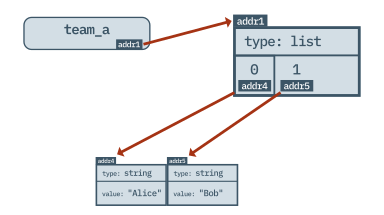
Because of Aliasing. When we typed team_a = ["Alice", "Bob"], Python built a list object in memory (let’s say at address addr1) and attached the team_a name tag to it.
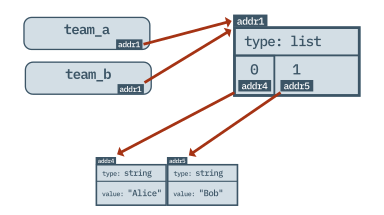
When we typed team_b = team_a, Python did not create a second list. It simply looked at where team_a was pointing, took the team_b name tag, and stuck it onto the exact same object at addr1.
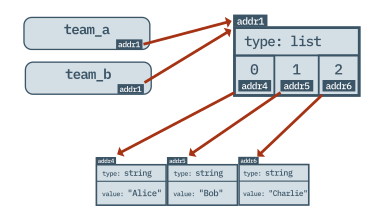
Because both variables are pointing to the exact same list, using team_b and appending “Charlie” at the end means “Charlie” is there when you check the list using team_a. They are two names for the same thing!
6.4 Slicing Lists
What if you want to grab more than one item at a time? Python allows you to Slice a list using a colon (:).
Let’s look at an example. We have a list of monsters, and we want to grab the middle three.
monsters = ["goblin", "orc", "dragon", "troll", "slime"]

# Grab from Index 1 and stop just before Index 4
middle_monsters = monsters[1:4]

print(middle_monsters)
# Output: ['orc', 'dragon', 'troll']
The first number is where the slice starts, and the second number is where the slice stops. But notice that Python grabs up to, but NOT including, the stopping index. So monsters[1:4] grabs Index 1, Index 2, and Index 3, but it stops before it grabs Index 4.
Slicing Shortcuts
If you want to slice from the very beginning or the very end of a list, Python lets you leave the numbers blank as a shortcut!
# Leave the first number blank to start from the very beginning
first_two = monsters[:2]
print(first_two)
# Output: ['goblin', 'orc']

# Leave the second number blank to go all the way to the end
last_three = monsters[2:]
print(last_three)
# Output: ['dragon', 'troll', 'slime']

# Leave BOTH blank to make a complete copy of the list!
list_copy = monsters[:]
Negative Indexing (Counting Backwards)
What if you want the last item in a list, but you don’t know how long the list is? Python has a brilliant trick: Negative Indexing.
If 0 is the first item, -1 is the last item. -2 is the second-to-last item, and so on.
print(monsters[-1])
# Output: slime

# You can even use negative numbers in your slices!
# Let's grab the last two monsters:
print(monsters[-2:])
# Output: ['troll', 'slime']
The Step Counter (Advanced Slicing)
There is actually a secret third number you can add to a slice, called the Step. If you add a second colon, you can tell Python to skip items. The format is [start : stop : step].
# Start at 0, go to the end, but jump by 2 (grab every other monster)
every_other = monsters[0:5:2]

print(every_other)
# Output: ['goblin', 'dragon', 'slime']
Because we know we can leave the start and stop numbers blank to cover the whole list, we can write that exact same step slice much shorter: monsters[::2].
If you use a negative step, like monsters[::-1], it forces Python to step backwards, while making a reverse copy of your entire list!
6.5 Mutability (Modifying Lists)
Lists are Mutable. In computer science, “mutable” simply means “capable of being changed.” After you create a list, you are allowed to add items, delete items, or overwrite existing items.
1. Overwriting by Index
If the player upgrades their sword, we can overwrite Index 0 using the assignment operator (=):
backpack = ["wooden sword", "shield"]
backpack[0] = "steel sword"

print(backpack)
# Output: ['steel sword', 'shield']
2. Adding Items: .append()
To add a new item to the very end of a list, we use the .append() method.
backpack = ["sword", "bread"]
backpack.append("gold")

print(backpack)
# Output: ['sword', 'bread', 'gold']
3. Removing Items: .remove()
If the player drinks their potion, we need to remove it. The .remove() method searches the list for the exact string you provide and deletes the first one it finds.
backpack = ["sword", "bread", "gold"]
backpack.remove("bread")

print(backpack)
# Output: ['sword', 'gold']
If you try to .remove("map") but “map” is not in the list, Python will throw an error!
4. Inserting in the middle: .insert()
If you want to put an item at a specific index and push everything else down, use .insert(index, item).
queue = ["Alice", "Charlie"]
queue.insert(1, "Bob")
print(queue)
# Output: ['Alice', 'Bob', 'Charlie']
5. Removing by index: .pop()**
If you know the index number, you can “pop” the item out of the list. If you don’t provide a number, .pop() automatically removes the very last item.
foods = ["Pizza", "Banana", "Steak"]
foods.pop(1)
print(foods)
# Output: ['Pizza', 'Steak']
6.6 Built-In List Tools
Python comes with built-in functions designed specifically to make working with lists easier.
List Math
You can concatenate (glue) two lists together using +, or repeat a list using *.
list1 = [1, 2]
list2 = [3, 4]
print(list1 + list2)
# Output: [1, 2, 3, 4]

print([0] * 3)
# Output: [0, 0, 0]
Checking the Length
We can find out exactly how many items are in a list by using the built-in len() function.
backpack = ["sword", "shield"]
```python
backpack = ["sword", "shield"]
print(len(backpack))
# Output: 2

backpack.append("rope")
backpack.append("map")
backpack.append("torch")
print(len(backpack))
# Output: 5
Notice that len() returns the actual human count of 2. Just because computers like to start counting at 0 doesn’t mean they don’t know how to count! So the index of the last item in a list is always one less than the length of the list. You will use that a lot in code as len(list) - 1.
Sorting
You can sort a list alphabetically or numerically with the .sort() method.
scores = [50, 10, 100, 25]
scores.sort()

print(scores)
# Output: [10, 25, 50, 100]

names = ["Mario", "Luigi", "Peach", "Bowser"]
names.sort()
print(names)
# Output: ['Bowser', 'Luigi', 'Mario', 'Peach']
Checking if an Item Exists:
You can use the in keyword inside an if statement to ask the computer if an item exists anywhere inside a list.
backpack = ["sword", "key", "apple"]

if "key" in backpack:
    print("You unlock the door!")
if "gold" not in backpack:
    print("You don't have any gold.")
Notice we can use the not keyword to check if an item does not exist in the list.
Splitting Strings into Lists
When a user types a long sentence into input(), it is stored as one giant string. But what if you want to look at each word individually?
The .split() method takes a string, chops it up wherever there is a space, and instantly gives you a list of words!
sentence = "open the heavy door"
words = sentence.split()

print(words)
# Output: ['open', 'the', 'heavy', 'door']
This is incredibly useful for text-based games where players type commands like “drop sword” or “eat apple”.
6.7 Tuples: The Immutable List
There is another data structure in Python that looks and acts almost exactly like a list. It is called a Tuple (pronounced two-pull).
You create a Tuple using parentheses ( ) instead of square brackets [ ].
# This is a List
player_inventory = ["sword", "shield"]

# This is a Tuple
directions = ("north", "south", "east", "west")
You can grab items out of a Tuple using zero-indexing just like a list: print(directions[0]) will print "north".
So, what is the difference? Tuples are Immutable. “Immutable” means unchangeable. Once a Tuple is created, it is locked forever. You cannot .append() to it, you cannot .remove() from it, and you cannot overwrite its indexes.
Look what happens if we try to change a Tuple:
>>> directions = ("north", "south", "east", "west")
>>> directions[0] = "up"
TypeError: 'tuple' object does not support item assignment
What is the point of a Tuple? If they are just locked lists, why use them? Tuples are safe. When some information needs to change, like a player inventory, it must be a changable or mutable List. But some data, like the days of the week, or the mathematical coordinates of the center of the screen, should never change. By storing them in an unchangeable or immutable Tuple, you prevent yourself (or other programmers) from accidentally deleting or overwriting that data later in the code.
Once we learn to write our own functions, we will see that Tuples are also a great way to pass around data safely. But for now, just remember: Tuples are locked lists.
Challenges
There is no project this chapter. Instead, try these challenges on your own.
Challenge 1
A programmer wrote the code below to print the final high score, but it crashes with an IndexError. Figure out why the computer is crashing and fix the code.
# Broken Code!
high_scores = [150, 95, 42]
top_score = high_scores[3]
print(f"The top score is {top_score}")
Challenge 2: The Merchant Shop
Your adventurer has walked into a local village to buy supplies. Open a new file and type this starter code:
player_gold = 50
player_inventory = ["sword"]

store_inventory = ["potion", "shield", "map", "rope"]
item_cost = 20
Write a script that does the following:
- Prints the
store_inventoryso the player knows what is for sale. - Asks the player what they want to buy using
input(). - Writes an
ifstatement to check if their choice is in thestore_inventoryand their gold is>=20. - If true, subtract 20 from their gold (
-=),.remove()the item from the store, and.append()the item to the player’s inventory. - Print their new inventory list!